Teaching a shared inbox to sort itself
A 48-hour B2B design challenge: let office managers at home service businesses build their own AI-sorted folders, so every call, text and lead reaches the right team in the right order, and they can see why.
- Role
- Product Designer
- Timeline
- 48 hours
- Team
- Solo
- Platform
- Web App (B2B)
Overview
An inbox that sorts itself
Home service businesses (HVAC, plumbing, electrical) get hundreds of customer conversations a day: calls, texts, web chats, forms and leads from sites like Google and Angi. All of it lands in one shared inbox that several teams work from. Today the folders that split it up are set up by the platform's own staff.
The challenge, from a B2B communication platform, was to let each business build and maintain its own smart folders that fill automatically, using customer records and an AI that reads each conversation. The person setting it up is an office manager who has never written a prompt or a query.
I designed the whole loop in Figma, from creating a first folder to fixing one after launch. Then I built a working prototype in code with Claude Code, so I could test the parts a static screen can't show, like conversations moving between columns the moment a rule changes.
Problem
Hundreds of conversations a day, and one inbox for all of them
Office managers don't want to dig through 4,000 unorganized messages
Every call, text, chat and lead lands in the same list, and sales, scheduling, billing and management all work from it.
An office manager wants answers to four questions:
- Is every conversation reaching the team that should handle it?
- Is my team working on the most important things first?
- What is slipping through the cracks?
- Can I fix it myself when it isn't working?
Fields like lead source or booking status are easy to filter on, but they miss what matters in the conversation itself: "they're comparing us with two other companies" or "they want a whole new system, not a repair." Only the AI can read that, and it's the hardest part to get right, because someone has to describe "a hot lead" so the model understands it the way they do.
How might we let someone who has never written a prompt build an AI-sorted folder they actually trust?
Designs
Building, testing and launching a folder
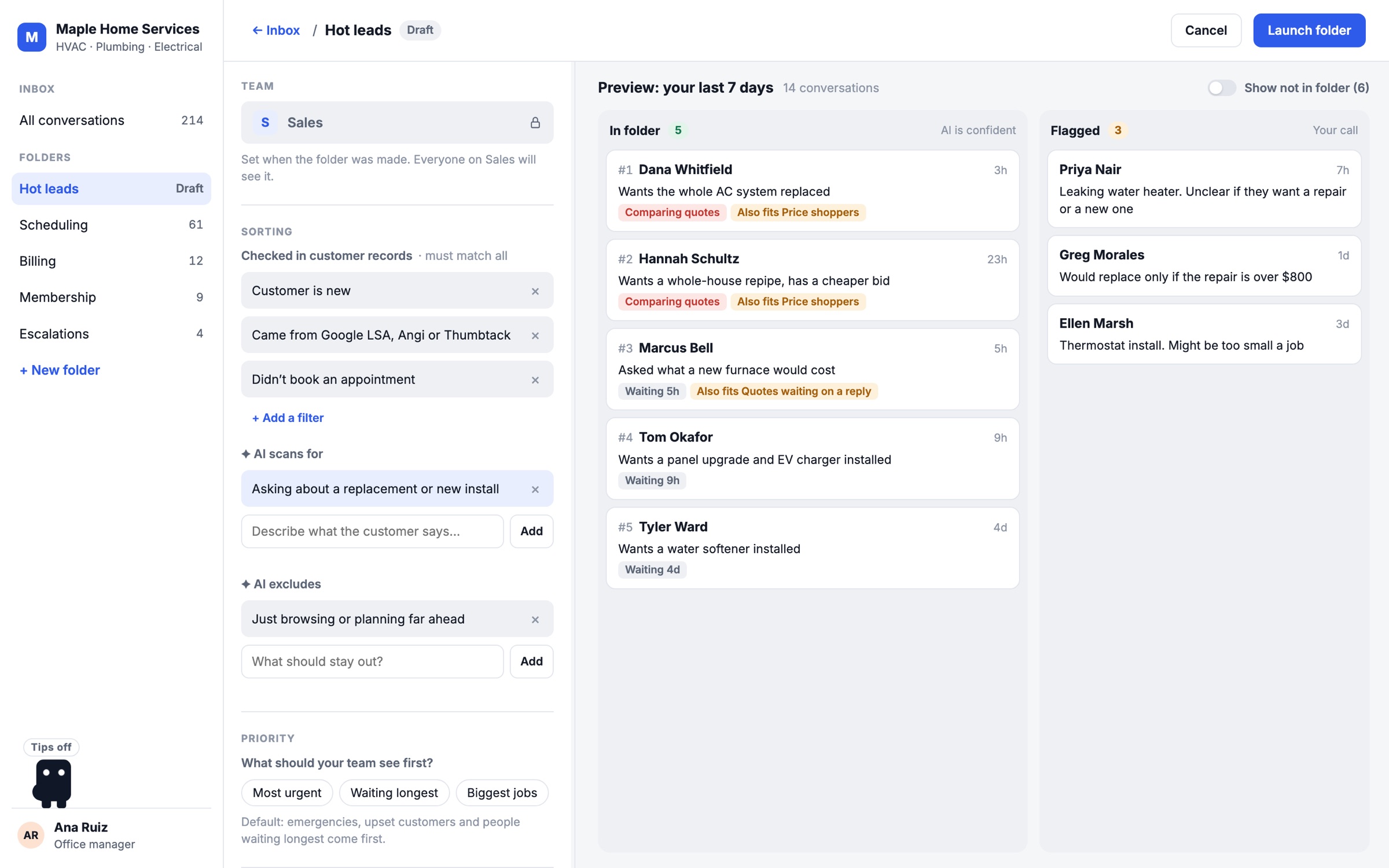
Every screen keeps the office manager's own conversations front and center, so they're always judging the AI against something real.
Research
What would make someone trust it
Who's setting it up
The office manager knows the business, the customers and the teams better than anyone. What they don't have is time, or any interest in learning a query language. The product has to use what they already know without asking them to translate it.
What I designed around
- Start them off with something. Suggestions come from their own last 7 days, with real counts, so they see value before doing any work.
- Let them see it working. People trust what they can check, so every conversation shows which folder it landed in and why.
- Say when the AI isn't sure. Unclear cases get flagged for a person instead of quietly guessed.
- One answer should fix similar cases. Deciding one unclear conversation can become a rule for every one like it.
- Keep settings to a minimum. Every extra option is something a busy person has to keep up with.
Ideation
How a folder decides, and the four big decisions
How a folder decides what belongs
Customer records are checked first, then the AI reads only what's left:
New conversation
A call, text, web chat, form or marketplace lead comes in.
Check records
Customer status, lead source, booked or not. Exact and predictable.
AI reads it
Looks for what the folder scans for, and skips what it leaves out.
Three outcomes
In folder when it's clear. Flagged when it isn't. Not in folder, with a reason.
Priority
Most urgent first, or the order the team picks.
Record filters combine the way people talk. Every row has to match, and picking several options in one row means any of them. "New customers from Google or Angi who didn't book" works exactly as it reads. I left out an AND/OR switch, because that kind of logic is where people lose track of what a folder will catch. The rare "this field or that field" case, like a VIP who is either a member or a big spender, works better as a second folder or as something the AI looks for.
Decision 01
Classification model
Creating the two-part system: exact filters on customer records first, then the AI reads only the conversations that pass.
Reasoning
- Easy for users to understand.
- Pretty accurate, because it works like setting nets to catch all the relevant conversations.
- Cheap, because the filters run first and the AI only reads what passed them. A busy shop might get about 600 conversations a day. If the filters cut that to 250, the AI reads only those 250.
- Easier to build presets and suggestions with, and easy to give feedback on.
Other options considered
- Learn from examples only and apply those rules based on conversational classification
- Combine structured rules and conversational classification with a point system
- AI handles everything from one description: reads and tags, then classifies based on those tags
Decision 02
Build experience UI format
Short pop-ups for setup, then a full-page split-screen test.
Reasoning
- It's about how people start, and making that as easy as possible.
- Questions are easy to answer, like picking a preset drawn from the last 7 days.
- Clean and modern.
- The pop-ups handle the basic setup, so the test screen is simpler and the value shows right away.
- It builds trust, because the next screens feel like the AI captured what you said.
Other options considered
- Go straight into the split-screen test and do all edits in the left panel
- One long questionnaire before the preview
- Build a folder from the inbox by selecting a few conversations and choosing “Make a folder from these”
- Chat-style setup
Decision 03
Separating priority from criteria
Eligibility first, then priority. The AI tags intent and mood once per conversation, and those tags drive the default order. Teams can pick and rank their own priorities.
Reasoning
- Shortens setup, so the value shows sooner.
- Makes more visual sense: it's intuitive to adjust when you can watch conversations shift around.
- Cheaper, because the AI only tags and sorts the conversations in that folder.
Other options considered
- A combined score that decides both membership and order from a points system
- Only simple filters, like sort by time or recent activity
- A free-text box only
- Sliders or weights
Decision 04
Signals after launch
A side panel on the folder that holds activity, notifications and flagged items.
Reasoning
- Easy to see, review and apply changes without getting lost in the flow.
Other options considered
- A full-page dashboard with folder stats and health
- A weekly summary
Engineering
Keeping it fast and affordable
The live preview is what makes people trust a folder, and it's also the most expensive part to run. Each choice below gives something up, so here's what each one gets, what it costs, and how the design deals with it.
Check records before the AI
What you getFast, predictable results that are easy to explain.
What it costsSome judgment calls can't be written as a field.
How the design handles itThe AI rules cover what fields can't, like comparing quotes.
Read each conversation once
What you getPriority and most edits re-sort right away, without asking the AI again.
What it costsNotes can go out of date when a conversation keeps going.
How the design handles itA conversation gets read again when new messages come in.
Live preview while editing
What you getPeople see exactly what a change does before anything goes live.
What it costsA brand-new AI rule means re-reading every conversation in the preview.
How the design handles itIt runs when you press Add, not on every keystroke, and says how many conversations would move first.
No AND/OR switch
What you getFilters read like a sentence, so there's nothing new to learn.
What it costsOne folder can't say 'a member or a big spender'.
How the design handles itMake a second folder, or describe it for the AI.
Preview on the last 7 days
What you getReal conversations people recognize.
What it costsA slow week can be too small to judge a rule.
How the design handles itLook back further when there aren't enough conversations.
Two more things a real build would need. The preview has to run the same logic as the live folder, or it stops meaning anything. And a busy shop has hundreds of conversations a day, so the columns should show counts and the top cards rather than everything at once, following the same access rules as the inbox.
Lessons
What I'm least sure about, and how I'd find out
Open questions I'd test first
- Can the AI read messy, real conversations? Call transcripts trail off and people talk over each other. If the AI misreads them, Flagged fills up and the team stops trusting the folder. I'd run it on about 500 real past conversations and have office managers mark each result right or wrong.
- Will busy teams actually check Flagged? Those are exactly the cases that slip through the cracks. I'd track how long flagged conversations sit before someone opens them.
- Can a first-time office manager set this up alone? The likeliest confusion is the difference between "checked in records" and "AI scans for." I'd run five sessions where someone builds a folder on their own and watch where they get stuck.
What I learned
- Be ready to explain the logic, not just the screens. The first question in review was how the filters combine, AND or OR. The design already answered it, but I hadn't put it into words. Now it's a simple rule: every row has to match, and any option within a row counts.
- Every "instant" moment has a cost. A live preview feels free in a prototype. In a real product, each time the AI re-reads costs time and money, so planning around that (records first, read once, preview on Add) is a design decision too.
- Talk to office managers first. I made overlap rules automatic because hundreds of conflicts at once would be exhausting, but I never checked that teams want that. It's still an assumption.
- Prototype in code earlier. Watching conversations move as rules change explained the idea better than any static screen, and building it changed decisions I thought were settled.